Tuesday, February 23, 2010

Softening images


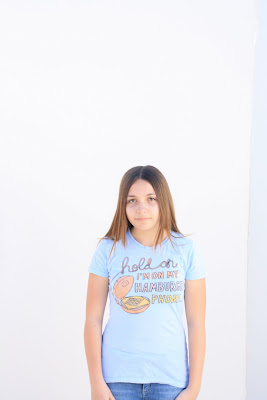
I used the same image I used for the brushes assignment. For this assignment we were supposed to soften the image to make it look kind of airbrushed. Like photos in a magazine.
We followed a tutorial on photoshopessentials.com called Easily Smooth and Soften Skin. It was pretty simple. What softening seems to do is to make the image a bit blurry. To make specific features sharper we used the brush tool.
I can see a huge difference between the image to the left and the original.
Softening the image is defiantly useful and I will probably use this for every image I take.

That's all for now
Bye! :3

Saturday, February 20, 2010

Playing with brushes in Photoshop

Before:
This photo of me was taken by John Paul. We took these images outside with a white background that helped block the sun. Someone held up a white card to shine some light on me. This photo shoot was very fast paced and if you weren't paying attention you missed a lot of useful information. I really like the lighting because even though we're outside the lighting isn't so harsh.
After:
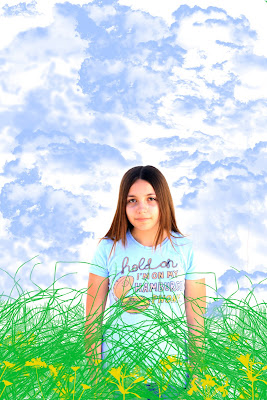
After we shot everyone (in the nonviolent way) we went back inside and learned how to edit the photos in Photoshop. First we changed the height, width, and resolution of the picture. Then we messed with the levels to make it look a little nicer. We downloaded some cool brushes from brusheezy.com and that's where we were left to go crazy with them.

I edited this picture a few times before I finally got one that I really liked (this is actually attempt #3). In the image above I used three different kinds of brush sets. First, I used a brush set called Grass Brushes. I was just kind of playing around with it when I asked Darrian if she thought it would be cool if I put clouds, she said yes and helped me find a brush set called 24 Clouds (I would be so lost without Darrian). I used one of the shadows on my shirt to get the blue of the clouds. I experimented with the 24 cloud brushes in the set and was happy with the result but I felt something was missing. So I searched for flower brush sets and found Garden Plants Brushes. I chose the color yellow and put flowers both in front of and behind the grass.

Below are the other two images I did.
Attempt #1
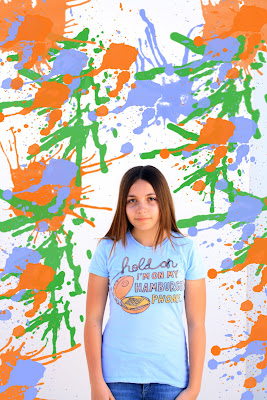
Again, I messed with the levels to make it look a little nicer. Then, I downloaded some splatter brushes and used green, orange, and blue. It's not that I don't like this image it's just that I wasn't really excited about it so I kept trying.
Attempt #2
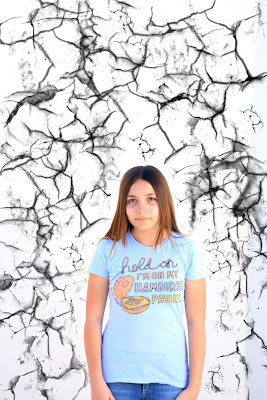
First, I messed with the levels then, I went looking for some cool brushes and found Crack Brushes I and Grunge Brushes 007. I used black and just went crazy putting cracks all over the background. Again, I just wasn't that excited about it.

I had a lot of fun with this project and have already started using brushes on some other images I have taken.

That's all for now
Bye :]

Thursday, February 4, 2010

ID Photos

This project was really fun! I took these photos inside, on the computer with Photobooth. My model is…………ME!! The point of this assignment was to create different personas for ourselves. It was very fun and creative.

For the first image I braided my hair and put on a plaid button up shirt. I look like a country girl. If I viewed this picture through someone else's eyes I would think they were just like everyone else, nothing really special, just a girl with braids.

For the second image I left my hair down, put on a tie dye t-shirt and a beaded beanie thing. I look like a hippie! If I saw this from someone else's eyes I would think this was taken in the 1960's or 1970's.

For the third image I stuffed my hair in my San Diego Padres baseball hat and borrowed my friend Chases' jacket. This is kind of how a lot of guys dress. They try to be hard and gangster so that was what I was trying to go for.

For the last image I parted my hair to the side, put on my red zebra shirt and used Darrians' headphones. I feel that this kind of reflects some teenagers today. The headphones show how much teenagers LOVE music. Many people would look at this photo and say that the girl in it is "scene" or "emo." I think it's just how that person wants/likes to dress.

I had a lot of fun with this assignment and will probably be doing some more at home just for fun.

That's all for now
Bye! :D

P.S. Tomorrow is Mrs. Alvarezs' last day D:
We'll miss you!!!!!!!!

Tuesday, February 2, 2010

Sequencing: Free Hugs


For my sequencing book I did Free Hugs. My models were; Darrian, Steffany, and Asia. I took the photos outside, behind the art buildings at school, on a particularly sunny day. The image above is the cover of my sequencing book titled Free Hugs. I painted it silver and glued ruined and blank negatives to it. The biggest image on the cover is a close up of Darrian holding my Free Hugs sign. The smaller image is of Darrian holding the sign and waiting for someone to come so she could hug them.

The image above is a full body shot of Darrian holding the sign waiting to hug someone. With this image I was just trying to set up the story. In the background you see a building, trees and how the street curves. I like this image because of the simplicity of it. It's just her standing there holding a sign.
I wasn't able to upload all my images, so you'll be missing some. Before these images there was one before it of Asia walking.
In the image on the left Asia stops in front of Darrian and looks at her. Darrian asks Asia, happily, if she would like a free hug.
In the image on the right Asia thinks Darrian is weird for giving free hugs and walks away without saying anything. Darrian is very sad that Asia didn't accept her free hug. I know from personal experience how much it sucks when someone thinks you're weird and denies your free hug. It's very sad and is blow to your self-esteem.


In the images before this one Steffany sees Asia walking away and that Darrian is sad. Steffany is one of those people who is cool and would accept a free hug. Steffany hugs Darrian. Darrian is taken by surprise when this happens. But in the image above she hugs Steffany and it is a happy ending.

The image above is the back cover of my sequencing book. I, again, painted it silver and glued blank negatives to it. I took an extra print of one of the images in my book and glued it on. In the top right corner is a quote I got off of the internet but it didn't say who said it. The quote is, "Happiness is an unexpected hug." I feel this quote is directly related to my story because Darrian was happy when Steffany hugged her.

I really enjoyed this project and I hope I can do more sequencing soon.

That's all for now. I hope you liked it.
Bye ^_^


Thursday, January 21, 2010

Photoshop

For this assignment I used a picture of Darrian that I took previously and a picture I got off of freestockphotos.com. I used the lasso tool in photoshop to copy the image of Darrian. I then pasted her to the sunset picture. I went back later and cut out places that should be showing the background. This assignment was very helpful because I know I will be using photoshop in the future and it was pretty simple too, as long as you followed directions.

That's all for now
Bye

Friday, January 15, 2010

Lighting, Camera, *shnap!*

This assignment was studio lighting. I used Darrian again because she is a wonderful model and I don't feel too bad when I have to tell her what to do (because she is my friend). In this photo we were inside with a black background and tungsten lights. She is sitting on the floor looking into to the light with a dazed expression. This was kind of by accident. She was waiting for me to tell her what to do and she was fixing her hair with that look on her face and I thought it would look good in a photo so I asked her to look in to the light (which was probably blinding her). The light is mainly on her face.

I think this image is successful because it shows emotion and makes the viewer wonder what she's looking at, why, and what she's thinking. Darrian looks really small and innocent and childlike. I like how the upper left side is dark and the lower right is light. I think because of that it draws attention to her. I had a lot of fun experimenting with lighting and shadows in this shoot and hope that I'll have another chance to manipulate lighting in the future.

Hope you liked it. Bye! ^_^

Tuesday, November 10, 2009

MOTION!!!

For this project I used Darrian again because she is a wonderful model and is very patient with my constant questions. In this picture she is outside and I have her holding an umbrella and jumping off of a bench. Everything in this photo is blurry and out of focus. I did this by accident. I actually wanted Darrian to be in focus and the background blurred. This was my first time taking a picture where the person is moving. It was very difficult and I am not completely satisfied with my shots.

While I am disappointed with how this photo came out I do think that it conveys motion. I hope to get better at taking photos of motion.

In this image Darrian is outside jumping over a trash can that a raccoon knocked over. This photo, I feel, came out better than my first. The raccoon is in focus while Darrian is blurred, just the way I wanted it. The background is not completely in focus but you can still tell that those are trees in the background.

I do have things about this image I wish I could change but overall I think that this photo is successful. I still feel that I need to get better at taking photos with motion.

Well goodbye for now! :D